How to Request a Transcript
Learn how to obtain official transcripts of your academic records from the Registrar's Office.
If you have never ordered transcripts before, please read through all of the instructions below.
- After you have graduated from UC San Diego you can order your transcript or view your Academic History using Social Login.
- Current students can order official documents through TritonLink.
- If you are a former student who has not graduated, you will need to use your PID/PAC to log in to TritonLink. If you do not have your PID (username) and/or PAC (password), follow UC San Diego's login information request procedure.
What is included on transcripts
Transcripts can be used as proof of enrollment and/or proof of degree, if applicable.
- Information featured on official transcripts includes:
- Student level, major, college
- Any degrees earned
- Any minors, programs of concentration, or areas of study (after degree conferral only)
- Any department or Latin honors (after degree conferral only)
- Coursework and final grades
- Unit summaries of Advanced Placement, International Baccalaureate, and transfer coursework
- Term credits passed
- Term GPA
- Term honors
- Cumulative credits passed
- Cumulative GPA
- Special Program courses (UC Education Abroad Program, Intercampus Visitor, Intercampus Exchange Program, etc.)
- Official transcripts do not feature:
- Date of birth
- Address on file
- Individual AP Exams and scores, but this can be added by request.
- Annotations of grade changes, including Incomplete grade changes.
- Disciplinary records
Before you order your transcript
Log into the Academic History tool to:
- View your current quarter grades
- Confirm grade changes
- Confirm your degree status, if applicable
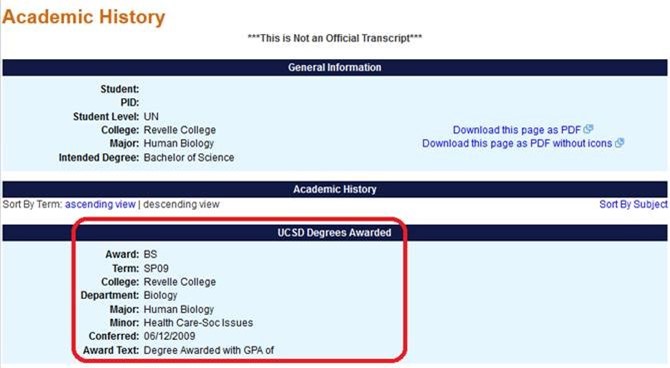
Alumni can access the Academic History using Social Login.
- Students who have graduated prior to 1991 will need to order official transcripts, as they no longer have access to their online academic history (unofficial transcript).
Ordering Options and Costs
|
Service |
Processing time/additional info |
Fee |
|---|---|---|
|
Electronic Transcript - PDF |
Emailed to requested recipient usually within 15 to 30 minutes of submission. |
Covered by the one-time document fee |
|
Paper Transcript - Mailed |
Mailed same day if ordered by 1:30 p.m. PST. |
|
|
Paper Transcript – Mailed with Attachment |
Consider this service when documents need to be sent with your transcript or require a Registrar’s Office signature or notarization.
Mailed within 3 – 5 business days |
|
|
With Co-Curricular Record (CCR) |
Do you have a CCR? To avoid delays with your order, please select this option only after verifying that you have a CCR.
If this is your first time ordering a transcript with a CCR, make sure to place the order through your CCR portal at myccr.ucsd.edu. Subsequent orders can be placed directly through Parchment. **ATTENTION: Transcripts with CCR are currently unavailable. We are working to restore service as quickly as we can, but as an interim measure, please order a standard transcript. You can still print an unofficial PDF of your CCR through the CCR portal. |
|
|
International 1st Class Airmail |
Mailed same day if ordered by 1:30 p.m. PST. |
$2.50 |
|
FedEx Delivery |
Orders without attachments are mailed the same day if ordered by 1:30 p.m. PST.
Orders with attachments are mailed within 3 – 5 business days. |
$22.50 to Domestic Addresses
$45.00 to International Addresses |
**All fees associated with your transcript order are non-refundable.
Login information and ordering instructions
|
Customer |
Login Information |
Ordering Instructions |
|---|---|---|
|
Current student |
Go to Order Official Documents. |
Follow ordering instructions here.
|
|
Former student (did not earn degree, withdrew, transferred to another institute, Special Program visitor) |
Log in using your PID (username) and PAC (password).
In need of PID/PAC credentials? Fill out, sign, and return the PID/PAC Request Form (PDF) to Registrar’s Office.
|
|
|
Summer Session-only student |
Log in using your PID (username) and PAC (password).
In need of PID/PAC credentials? Fill out, sign, and return the PID/PAC Request Form (PDF) to Registrar’s Office.
|
|
|
Alumni |
Log in using Social Login. |
|
|
UC San Diego Extended Studies student |
N/A |
Learn how to order official transcripts from UC San Diego Extended Studies. |
|
Background Investigator |
N/A |
Visit our office with the release form, your work credentials and business card.
Alternatively, please fax the release form, a copy of your business card, and your badge number to (858) 534-5723. Make sure to include the mailing address or email address which you’d like the transcript sent to. Requests are processed within 3 – 5 business days. |
|
Third Party |
N/A |
Proof of enrollment/degree can be obtained through the National Student Clearinghouse for a nominal fee. There is no fee charged if you do not get a record. Please work with the National Student Clearinghouse to resolve any discrepancy disputes. |
Other transcript-related requests
Download commonly issued transcript-related letters
Questions?
Contact the Office of the Registrar at transcripthelp@ad.ucsd.edu or (858) 534-3150.