Update Your Emergency Contact Information
Last Updated: August 14, 2026 12:49:55 PM PDT
Give feedback
It's important to keep your emergency contact information current! Check your information on a regular basis, and add your contact person or update them when needed.
Triton Student System (TSS) Update:
Please note that the information on this website only applies through the end of Summer Session 2026. If you have access to TSS, follow these instructions: My Personal Details: Emergency Contact Info in TSS
Logging in
-
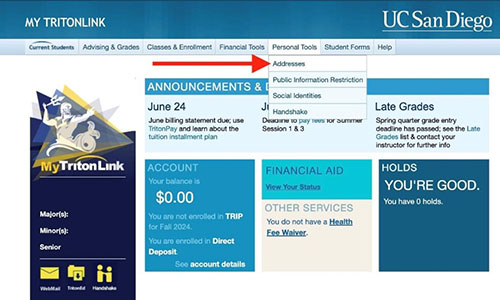
Log into MyTritonLink (mytritonlink.ucsd.edu) and navigate to Personal Tools > Addresses
Add an emergency contact
-
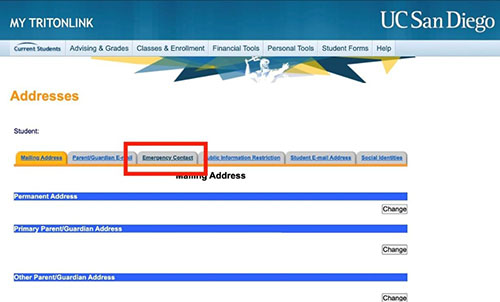
Select the tab labeled Emergency Contact
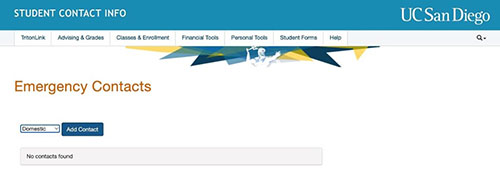
- Choose Domestic or International, and then click Add Contact
-
If you select Domestic, you'll be prompted to add a contact with a U.S. phone number
-
If you select International, you'll be prompted to add a contact with an international phone number
-
Click the Save button to add your emergency contact
Questions or problems? Email servicedesk@ucsd.edu or call (858) 246-4357 (6-HELP).