Plan Your Class Schedule
Build your class schedule before booking in TSS.
UC San Diego offers two planning tools that use the official Schedule of Classes data. Whether you prefer to build your schedule manually or want AI to help generate schedule ideas, both planners can help you prepare for booking.
Neither planner enrolls you in classes. When you're ready and your booking window is open, you'll complete your booking in TSS.
Choose Your Planning Experience
|
Class Planner |
TritonGPT Class Planner |
|---|---|
|
Best for: Fine-tuning and comparing schedules |
Best for: Exploring possibilities and discovering courses |
| Traditional schedule builder | AI-assisted planning |
| Build schedules manually | Describe what you want using natural language |
| Select sections yourself | Ask questions about classes |
| Compare multiple schedule options visually | Generate schedule ideas instantly |
| Customize schedules with drag-and-drop controls | Search by instructor, GE requirement, meeting time, modality, and more |
| Lock sections while testing different combinations | Export schedules to your calendar |
Which Planner Should I Use?
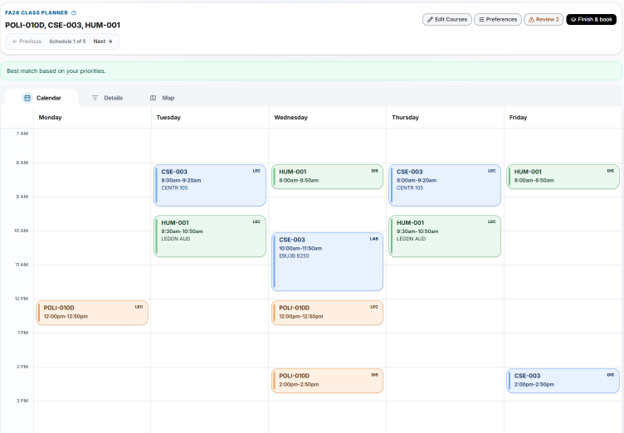
Class Planner
Use this planner if you prefer complete control over your schedule.
You'll be able to:
- Build schedules manually
- Compare several schedule options
- Set scheduling preferences
- Block off work, athletics, or personal commitments
- Lock specific class sections while trying different combinations
- Review final exam schedules
- Open your selections in TSS when you're ready to book
Class Planner screen shots:

TritonGPT Class Planner
Use this planner if you'd like help exploring your options.
You'll be able to:
- Describe your ideal schedule in everyday language
- Ask questions instead of searching manually
- Find classes by instructor, GE requirement, meeting time, or keyword
- Generate multiple schedule ideas
- Export schedules to your calendar
Example prompts
- Build a schedule with CHEM-006A and MATH-018 that starts after 10 a.m.
- Show me courses that satisfy the AHI requirement this Fall.
- Find classes taught by Professor Smith.
Video: How to search for a course
Important: Before You Book
Regardless of which planner you choose:
- These tools help you explore potential schedules; they do not book courses for you.
- You must complete course booking in TSS.
- Verify course details and current seat or waitlist availability in TSS before booking.
- Planner results do not replace academic advising. Contact your college or department advisor for guidance about degree requirements and which courses you should take.
Need help?
-
If you have advising questions, contact your advisor via the Virtual Advising Center.
-
Send technical questions about the class planner tool to tritonai@ucsd.edu